
Declining to Sign a Document
Learn the proper procedure for rejecting a document when you find errors, disagree with the terms, or are not the intended signer.
Understanding Document Declination
Declining to sign is a definitive action that stops the workflow for a document. It is primarily used when there are material errors in the contract, missing information, or if you simply do not agree to the terms presented.
Irreversible Action
Once you decline a document, the entire document is voided for all parties. You cannot "undo" a decline; the sender will need to create and send a completely new envelope.
Steps to Decline a Document
If you have reviewed the document and decided not to sign, follow these steps:
- Open the document using the link provided in the email notification.
- Review the content to confirm your decision.
- Locate the More Options dropdown menu, from top navigation bar.
- Select Decline to Sign from the dropdown options.
- In the dialog that appears, enter a required reason for your decision. This reason will be visible to the sender.
- Click the Decline button to confirm.
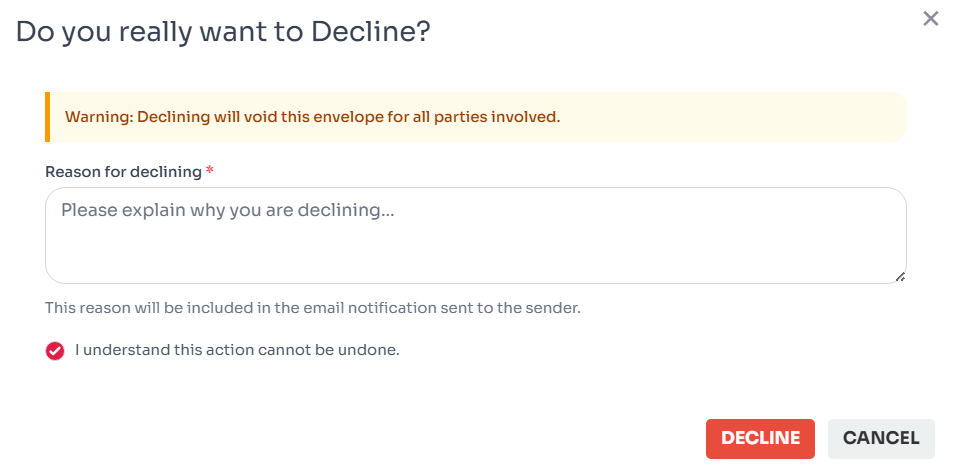
Figure 1: Document decline dialog.
Impact of Declining
When a signer declines a document, several automated processes are triggered to maintain the integrity of the transaction:
- Immediate Void: The document status changes to "Declined" (which acts as a Void). No other signers will be able to view or sign the document.
- Notifications Sent: The sender receives an email notification immediately stating that the document was declined, including the reason you provided.
- Audit Log: The action, timestamp, and reason for declining are permanently recorded in the document's history/audit trail.
Troubleshooting Declination Issues
Here are some common questions and issues regarding the decline process:
Link Expired
This signing link is no longer valid, the document has already been completed, recalled by the sender, or declined.
Accidental Decline
If you declined by mistake, contact the sender immediately. They must send a new document.
Mobile View
On mobile, the decline option is often nested under the "More" menu at the bottom.
Change Reason
You cannot edit the decline reason after submission. Send a follow-up email to the sender if needed.
list_alt On This Page
Related Articles
Need more help?
If you can't find what you're looking for, our support team is here to assist you.
Contact Support